The Two-Week Security Program Runbook for SMBs With No Starting Infrastructure
SMBs can build foundational security controls in two weeks with the right sequence.
A small or mid-sized business starting from scratch can build a defensible security baseline in fourteen calendar days. This two-week security program runbook puts inventory before enforcement, protective controls before monitoring, and training after the safeguards employees need to understand. The runbook connects protection and keeps it continuously enforced, with tools people watch and limits on the attacks it can prevent.
Why a two-week security program is achievable — and why sequence is the whole game
Starting from zero removes some obstacles that established security teams face. There is no legacy configuration to untangle, no conflicting incumbent tool, and no old deployment to preserve. That clean slate is an advantage for building protection. It lets a business build each control around the information and safeguards established by the previous one.
Buying controls one at a time often gets in the way. Each purchase adds another console and more work to manage it, while the gaps between systems stay open. A deliberate sequence avoids that coordination cost. Fourteen days is realistic when the work brings the deployments together into one enforced baseline.
What zero infrastructure actually means — and what the threat environment looks like when you have none
Zero infrastructure means nobody owns security, devices are uncategorized, access is ungoverned, and there is no process for noticing trouble. Email and cloud storage may already hold data the business needs. An attacker with a valid password can reach those systems without first breaking into a company laptop.
At-Bay’s InsurSec data identifies VPN exploitation as a dominant ransomware entry vector, with the trend nearly doubling in recent years. That makes remote access one of the first places to enforce controls. Email and web traffic also deliver credential theft and malicious software, which explains the later filtering layers.
Being small does little to shield a business from these attacks. Ransomware-as-a-service lets attackers rent tools to do things they cannot do on their own. The Semperis 2026 Ransomware Risk Report found that 69% of ransomware victims were targeted multiple times within the past year. Recovery therefore needs its own control because paying a ransom may leave the business exposed to further attacks.
How to think about the two weeks before touching a single tool
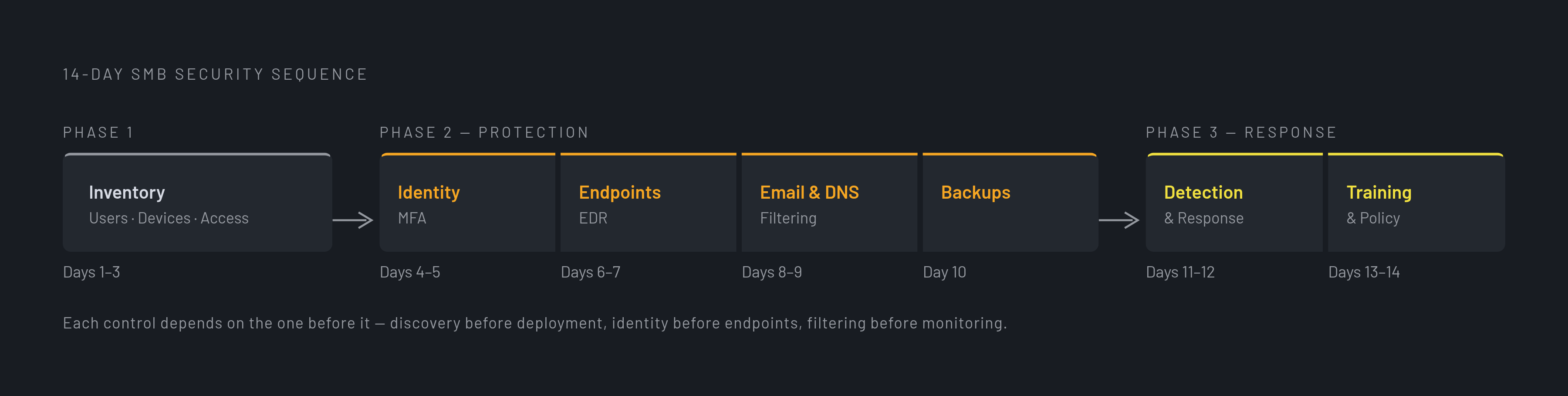
Phase 1, Days 1–3, establishes what the business has, including users, devices, systems, and access. Discovery comes before deployment. Otherwise, the team cannot distinguish full coverage from a dashboard that shows only the assets someone remembered to enroll.
Phase 2, Days 4–10, builds protection in dependency order. Identity comes first, followed by endpoints, email, network and DNS filtering, and backups. Phase 3, Days 11–14, connects detection to response and gives employees the training and procedures to support those controls. A unified platform reduces handoffs and the need for manual reconciliation when device, identity, and compliance information share a console. Opening the account records on Day 1 is a simpler practical starting point than any platform decision.
Days 1–3: Inventory before you build — users, devices, and access as the foundation
For the first three days, establish ground truth. On Day 1, open your Google Workspace admin console or Microsoft 365 admin center and export the user list. Repeat that account audit for every other SaaS system the team uses, including cloud storage, HR software, accounting, and payroll. Flag former employees and identify accounts with administrative or privileged access. Those accounts need different action later, so mark them now.
On Day 2, list every device that works with company data. Include laptops, desktops, phones, tablets, and any on-premises server or NAS. Record the operating system, user, and ownership of each device. Personal ownership changes what the business can enforce. A personal phone accessing company email belongs in this inventory just as much as a company laptop does.
On Day 3, map what each account can reach, including systems, data, and administrative functions. Flag permissions broader than the person’s role requires, and identify shared or generic accounts whose activity cannot be traced to an individual. This map prepares the business for enforcement. By the end of Day 3, you should know which accounts need restrictions, which devices need coverage, and where critical data lives. Day 4 starts closing those gaps.
Days 4–5: Identity controls first — MFA enforcement and access hygiene before any other tool goes in
Begin enforcement with the accounts already in the inventory. A stolen login can let an attacker use legitimate access without delivering malware or sending another phishing email. On Day 4, require multi-factor authentication at the admin level for mandatory employee enrollment.
Start with email and identity provider accounts because email can reset passwords for other systems. Next secure remote access, including VPN and remote desktop accounts, followed by accounting, payroll, financial systems, and cloud storage. Include administrative accounts across every system. Prefer an authenticator app over SMS where available, while keeping enforcement the priority. Give users Day 5 to enroll before limiting their access.
Use Day 5 to remove the access problems flagged during discovery. Disable or delete former employees’ accounts, replace shared credentials with an account for each person, and limit permissions to what each role needs. Where single sign-on is available, configure connected applications around it. That gives offboarding and compromise response a common revocation point instead of a separate cleanup task in every application.
Days 6–7: Endpoint protection and device management — securing the surfaces identities operate on
With users identified and accounts restricted, device management has an owner to attach to each endpoint. On Day 6, deploy endpoint detection and response, or EDR, across company-owned laptops, desktops, and servers in the inventory. Start with the devices used by people who have privileged accounts. EDR watches behavior rather than relying only on known threat signatures, making it useful against malicious software that changes to evade signature detection.
Apply baseline device settings during the same deployment. Enable disk encryption on laptops, a screen lock with a short timeout, and operating system auto-updates. On Day 7, set up automated patching for operating systems and critical applications on all company-owned endpoints. Manual patch cycles leave avoidable gaps. Device coverage requires both an installed agent and ongoing upkeep.
Decide what personal devices can access too. Require mobile device management, or MDM, enrollment before those devices can reach company email or cloud storage. Some employees will resist management of personal hardware. If enrollment is not feasible, move the user to a company-managed device or restrict access to a browser-only portal that does not cache data locally. Leaving the device unmanaged with unchanged access is not the fallback.
Days 8–9: Email security and DNS filtering — closing the delivery channel that drives most credential theft
Email filtering now reduces the attacks reaching protected accounts and managed devices. This order avoids relying on a filter alone to keep stolen passwords out of attackers’ hands. On Day 8, configure SPF, DKIM, and DMARC, the anti-spoofing DNS records that are free to implement and used to protect the company’s email domain against impersonation. They address a different problem from malicious attachments and links, so they do not replace message filtering.
Turn on advanced email filtering beyond the provider’s defaults. Look for attachment sandboxing, link scanning and warnings, and detection of suspicious message patterns. Microsoft 365 and Google Workspace have more filtering options. These filters aim to stop convincing attacks before employees act on them, because endpoint protection cannot stop every password from being entered into a fake login page.
On Day 9, configure DNS filtering to block known malicious domains before a browser connects. This also blocks attacks that come through malicious advertising, links shared in chat, and direct browsing. Remote devices need enforcement as well. With an agent, the control works beyond the office network, so it also helps teams whose members work apart and have no physical office.
Day 10: Backup configuration — the control that determines whether an attack becomes existential
Use the data map to prioritize systems and files whose loss would stop operations or cause the greatest harm. By now, earlier controls have also reduced the chances of an attacker reaching them. Sophos recovery data links intact backups to substantially lower recovery costs than compromised backups.
Configure automated, scheduled backups with version history. Store them offsite or in the cloud, segregated so a compromised endpoint cannot reach the backup destination. CISA warns that backups not separated from protected systems may fail to support ransomware recovery. Versioning provides a way back when the latest copy contains encrypted or corrupted data. Location alone is not enough.
Then restore a sample of critical data. Confirm that the process works and that the recovery time is acceptable. An unrestored backup leaves recovery unverified. This work also supports cyber insurance requirements that commonly include MFA and EDR. Day 10 completes Phase 2 with protective controls across the major layers, while the remaining days add responders and the human layer.
Days 11–12: Continuous monitoring — why tools without watchers leave attackers time to act
Detection without response provides only logging. Someone must respond when an alert comes in outside business hours. On Day 11, establish managed detection and response, or MDR, for around-the-clock monitoring, alert triage, and containment. A single security generalist cannot provide continuous coverage, and building an in-house security operations center is not realistic for this starting point.
Require pre-authorized containment in the service agreement. The provider should be able to isolate a compromised device without waiting for approval on every action. Otherwise, the provider alerts and waits while the attacker proceeds. Connected device state, identity information, and threat signals also help responders interpret events without reconciling separate dashboards.
On Day 12, write the internal escalation procedure. Name who gets called, who can authorize taking systems offline, and who communicates with customers or partners when data is involved. Keep it to one accessible page. State what employees may do before an expert responds and what they must not do, including paying a ransom or wiping evidence before investigation.
Days 13–14: Security awareness training and the policies that make the technical controls stick
On Day 13, launch a baseline simulated phishing test, followed by short, targeted training for employees who interact with it. Cover fake invoices, wire transfer requests, and credential-harvesting pages that imitate Microsoft 365 or Google login screens. Include voice and text impersonation of executives demanding urgent action. These attacks target judgment as well as software. Training gives employees a way to recognize pressure that technical filters may not stop.
On Day 14, document acceptable use, access and offboarding, and incident reporting. Explain permitted use of company devices and accounts, how access is granted and revoked, and how suspicious activity reaches the escalation contacts. Two pages per policy is sufficient for most SMBs. The documents should formalize the controls already built.
The handoff is a documented security posture that a customer, partner, or auditor can examine. Its strength comes from the connections between known assets, enforced controls, response authority, and employee behavior. That work does not end on Day 14. Quarterly reviews and expanded coverage as the team grows keep the baseline aligned with the business.
What security platforms can a mid-sized company actually deploy in two weeks?
To evaluate a platform against this runbook, ask about the completed program. Can device management, identity controls, and compliance monitoring all use the same data model? Can an endpoint signal appear in its identity context, and can a compliance gap surface without a manual audit? The platform must reduce the handoffs that would otherwise consume the deployment window.
Next ask who can operate it after deployment. Can a founder, operations leader, or IT generalist maintain the controls without expert configuration? Ask how monitoring connects to containment and how the business can demonstrate account enforcement, device coverage, and a successful restore. Those are stronger indicators of protection than a green dashboard. No platform can turn them into a promise that an attack will never succeed.
A consolidated platform fits this schedule when it brings device management, endpoint security, identity protection, and compliance automation into one enforced baseline. Getting separate tools to work together can stretch a fourteen-day build into three months or longer. Choose a system that connects the layers in the order the business needs them, and that a lean team can keep running afterward.
Sources
- Building a Culture of Security Consciousness: Getting a Security Program off the Ground as a 'Department of One' | Zip Security
- Small Business Cybersecurity Checklist: The Controls That Actually Matter | Zip Security
- Cybersecurity for Startups: A Practical Guide to Getting Secure on a Budget | Zip Security
- Identity Access and Device Management: A Simple Model for Modern SMB Security | Zip Security